Showing posts with label programming. Show all posts

Tuesday, February 23, 2016

Think inside the box!

The cliches of creative thinking could sometimes be counter productive.

As you all probably know, "think outside the box" and "find a creative solution" are common phrases in problem solving. Letting yourself loose of current constraints (Of, sometimes, resources, technology and money), and trying to find a solution outside of your current method of operation.

In our world, this could lead to adventurous, cost and money taking processes. Rewriting something because it doesn't work. Using a new library which solves "everything". Changing and switching components. Redesigning your UX.

However sometimes, the solution is not far away from what you already have.
Take a small piece of paper and jot down all the resources you already have in hand which could be involved with this problem. Now start writing possible solutions USING THOSE RESOURCES AND ONLY THEM.

You might just find you already have a solution inside your box.


Monday, January 25, 2016

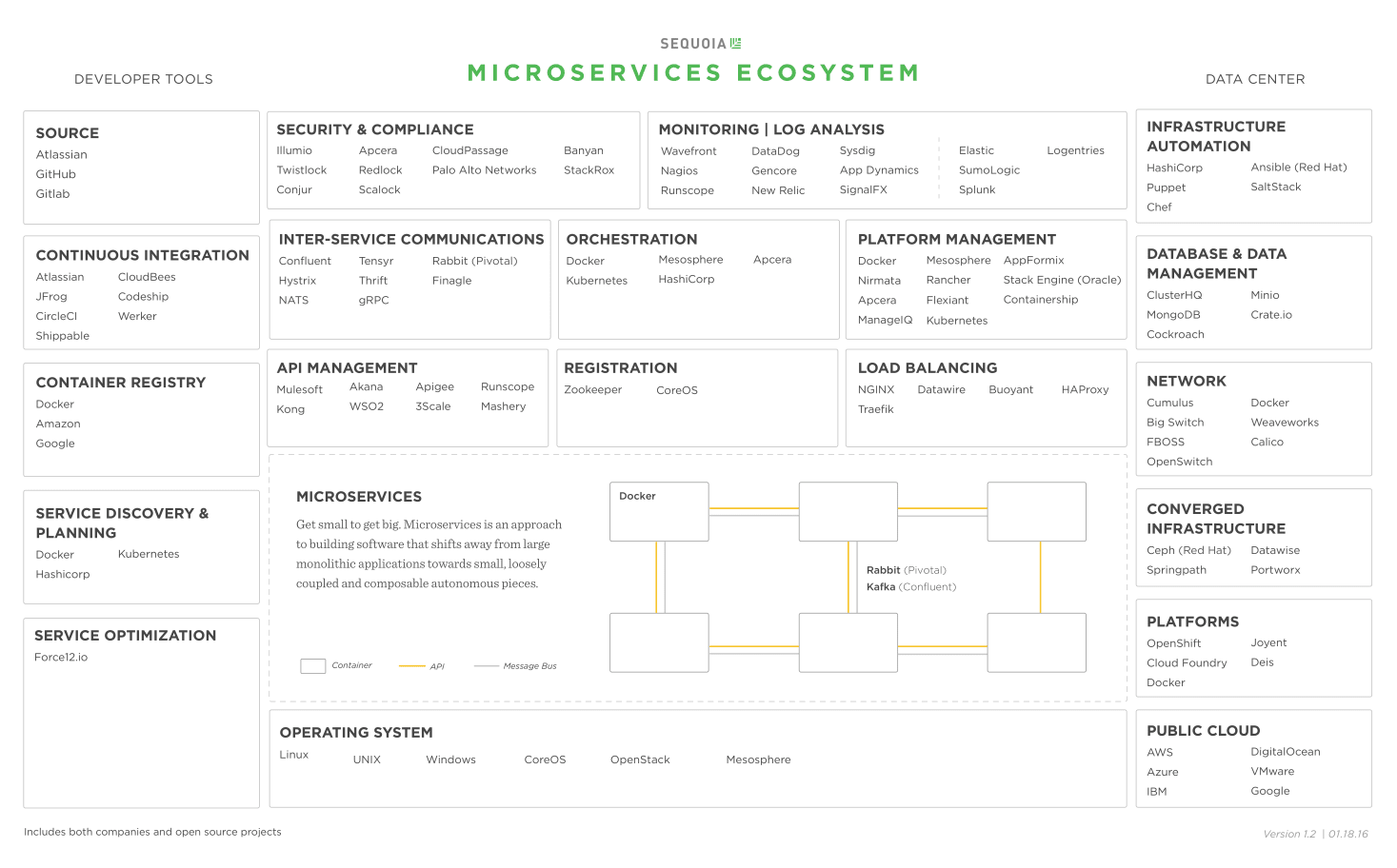
DevOps is the new Server side

A long time ago, the weight was different in the software world. Server side programming was considered to be the pinnacle of engineering, with lots of knowledge and skill requirements.

But open source changed all that. Most server side problems are already solved by off the shelf code, and server engineers became more integrators and architects than actual programmers: It's pretty easy to connect everything, build a logic layer (That might be complicated - But mostly due to large amount of product requirements and not complexity), an API layer, a database et voila!

As server code becomes simpler (And client code becomes more complex and rich), the main challenge for backend and application engineers became the DevOps side.
Building, the application, integrations, dependencies and frameworks, automating processes and tests, securing, backing up and scaling the system have become the skills to learn.

And while those skills used to be owned by selected devops engineers, more documentation and better tools allow every server side engineer with network and os knowledge the ability to do all of the above.

All of this, of course, helps you focus on what's really important as a developer: Delivering.

Microservices ecosystem (Credit: Sequoia)

Thursday, August 21, 2014

Shifting weights... And Cluster Performance.

At the beginning, there was one machine.

One server ran our database and web application.

But as our database began to scale, we needed to separate them.
Separating the servers is easy - Just define an 'internal' network, and let the machines communicate via the internal leg.

However, this caused another problem - We began to experience long lags when transferring large datasets between the machines.
When dataset was larger than X items, performance began to degrade, and was substantially slower due to network lag. Below that, performance was actually better.

Part of it was due to node's mysql drivers. They're just slow. (Compared to native mysql drivers)
The other part was network lag.

So how do you solve it?
Part of my original design was using mysql as a data store - Only use simple sql, no arithmetical operations and aggregations. This allowed us to move from mysql to mongodb easily, and eased CPU load for the database.

But now it's time to shift the weight, because bandwidth is our new bottleneck.
So we're moving some of the heavier processing into the database so that a smaller dataset would transfer faster. Much faster.

Performance is a delicate art of balance. Always remember that paradigms change as scale changes. Don't be afraid to shift weight in order to keep your system balanced.


Sunday, December 22, 2013

New stack, full stack.

In the past month I've been busy rebuilding the LightApp stack from scratch.
LightApp is a very cool startup in the industrial energy management field.
The product's essence is collecting data from various sources (Sensors, meters, production databases) of huge factories and analysing it to find ways to improve their effectiveness and reduce their costs and carbon footprint.
Previous product was built over LAMP stack (Linux/Apache/PHP/MySql), using the webii PHP framework, and had a lot of limitations - One example was heavy relying on SQL to perform statistical analysis, which was costly and shown poor performance and response time.

We've decided to rebuild the client (Not the database) with node.js, and after less than a month (We're a team of two) we've managed to almost completely finish our rewrite.
For UI we've decided to use bootstrap and amcharts, and manage the data ourselves (Rather than use a framework like angular or backbone).
Over the server side, express was used for main routing, mysql for database connection, and nunjucks for server side HTML.

The application doesn't have too many end users (Expecting few hundreds during 2014), but each user is performing heavy statistical analysis operations (Like a distribution of hourly data per category over a period of 6 months) - Which should be done really fast, and it is. Querying large data sets and crunching them in node is amazingly fast, but in the near future we will move our data to mongo, which can perform this analysis even faster.

Developing the whole stack in Javascript is fun - Though the language has a lot of limitations, it's fun to use, easy to debug and test, and, for our use, proves to be cost effective. Node.js asynchronous programming mode takes some time getting used to, but if you've dealt with AJAX on the client side, you'll be quite familiar with it.

I would highly recommend every programmer to try writing a full stack JS application. It's amazing how Javascript has evolved in the recent years.


Monday, October 21, 2013

Tunnel vision


During the life cycle of a 'live' system, things tend to break.
Sometimes because you've missed something, sometimes because you didn't get to test that bit of code. But whenever a system turns live, after a while (Sometimes it happens pretty quick...) the system needs to handle something you haven't tested.
Sometimes even an unexpected failure. Sometimes network lagging causing timing issues.

Few of these times, you encounter what I would like to call a gremlin. That's this illusive bug which impacts your system, occurs enough times a day to be considered as a problem, but not enough so it's easy to reproduce.

The worst thing programmers love to do is mark it as 'irreproducible', throw it back at the QA, and do something else.

Advice for this stage: Don't. QA would probably not be able to reproduce it, and even if they would, it would be difficult for them to do it in a consistent manner so that you'll be able to gain from it. You need to help them. These things escalate fast, so don't put yourself in the position of the developer who tried to put the mess under the rug.

Start digging. And sometimes, the solution requires processing through endless logs (Or even add these logs). Sometimes a lot of code is involved. And after a few hours, if you still haven't found it, you find yourself repeating your actions, adding more logs, running sequences again. You've entered a stage of tunnel vision, where you can't look around.

Best advice for this stage: Stop. Go get coffee, go home, call someone, take a break. My best solutions came from getting some distance from the problem I've been working on, in order to clear my vision and be able to try a new approach. Another fresh set of eyes could work as well.

Happy hunting.


Sunday, July 7, 2013

Performance issues? Remain calm and analyse.

Web companies are all about growth.
But also about speed.
It's all about getting your great idea out there, as fast as you can, which means scale and performance issues could be left 'for later' (Which is mostly a good idea at the beginning stage, when resources are sparse, and time is an issue).
Once your service scales from 100 users to 10000, you will encounter performance issues. If you have an app, response times would slow to a halt. A site, data loads slow.
In 2013 Google IO UI sessions, it was mentioned that app users tend to close their app when waiting for more than 10 seconds. While that might sound harsh, imagine tapping, waiting 10 seconds, then tapping again, waiting again - I would uninstall such an app, or never visit such a website (Unless they have something I really, really need, in that case I'll look for a competing product before uninstalling)

Clear your head. Analyse the situation.
So, what do you do?
First, don't pannick. Performance issues happen to everyone. (Kidding)
But be focused, because time is of the essence here.

An 'automatic' go to solution is upgrading your hardware - I wouldn't go there unless I was really desperate - This is hardly ever a scalable solution.

First thing you would want to do is analysis.
The base for all solutions shouldn't be by intuition alone - This could lead you to waste time on ideas that may or may not bring the solution, and waste valuable time.

- Analyse each step by time, dump it to a log file. Find the 10 most time consuming tasks, and select the easiest ones to take care of.
- Analyse DB calls - See which ones are being performed to most, or which ones take a lot of time.
- Analyse insertion rates - Maybe a queuing mechanism could solve some bottlenecks.

- Always use a perl script to 'clean' logs, do count operations on logs, and a spreadsheet to calculate and sort stuff - These are the best ways to get insights.
- Call a friend. Four eyes are always better than two.
- Call an expert. It's cheaper to pay someone for two expensive days of work and get your issues solved than lose a week of momentum.

And a final note - Don't try to rewrite your server in two days of 'no sleep'... ;)

Good luck.


Saturday, June 30, 2012

Don't fall in love with frameworks

The javascript world is on fire!
You've got tens of frameworks, all made to enable making javascript and web development easy.
angular, backbone, less, _, GWT, wicket, the old and established extjs, prototype, yui, and jquery (To name a few) have become common names among developers.

Some frameworks are meant to make your life easier with dom traversing and manipulation and encapsulate javascript features (jQuery, prototype), some add UI functionality (extjs, yui), while others offer full application frameworks.

However, these frameworks come with a price.

Once you bind your application to a framework, it's very hard to get rid of it. It's very hard to change parts of your application, once your web application is fitted with the paradigm of a framework.
Binding UI to model is another problem - Some of these frameworks bind data to UI components.

While this makes your initial development easy, once your application surpasses some volume and features, programmers tend to break this model (Something which is quite easy with javascript).

Binding is also very hard to debug - Sometimes you'll get an impossible to understand and follow call stack, especially with frameworks which bind model to UI components via events.

Another reason is performance: If all you want is a 3 page application which loads json objects, parses them and presents them on screen, using a full fledged MVP framework is a little bit of an overhead.

... And now, for the worst part.
You've written a nice widget/ control/ viewer/ whatever.
Now someone wants that object in his legacy system.
It's very hard to integrate binded code.
You tell him you can't.
He asks you why did you use the framework, if your code isn't recyclable.
You say 'it is, but you need to rewrite your whole client'.
CTO approaches you with angry eyes.

The rest - You know.

So next time you consider using a flashy, 'easy' to use framework, please ask yourself these questions:
- Will you need to reuse this code somewhere else?
- How much overhead will the framework add? Is it really necessary?
- How intrusive is that framework, in case you want to replace it?
- How much time would it take your team to develop the features you need from the framework? Don't add a full fledged framework for the sake of a neat button!
- How cryptic is the code? (Angular.js is a good example - Great framework, but you need to go all the way with it in order for you to enjoy its advantages.)
- How easy is it to debug? I know some of them are really, really hard.
And, finally:
In 6 months from now, will it bring value to your system, or will you need a month of knowledge transfer just to get someone new to write features into your app.

Be responsible - Use new technology that brings value, not heartbreak...



Sunday, April 8, 2012

Simple Gallery - The next phase

Been thinking a lot about my Simple Gallery Management Project.
So far, it's been downloaded ~200 times (130 for version 2.0), and after implementing ~6 projects with it, I'm thinking about taking it to the next step, and making it an even simpler, more generic CMS.
This means generalizing the database, redoing the management portal into a cool, hierarchy-like content portal.

I'll still be using HTML/ JS/ PHP (For json API)/ MySQL as a platform, simply because the cheapest hosting services are under that platform. I could implement it with node.js and mongodb, but that would be overkill. Only when I implement a simple social network, then I might use these platforms - There are few services (Like dotcloud) which do node.js and mongodb hosting, and they are not meant for the SOHO customer requiring our services (myartichoke).

This also got me thinking - What about social networks? Does anyone really need to implement a social network anymore? The 2 major risers in the social network battlefield these days (instagram and pinterest) are less about social, and more about sharing and following, rather than full fledged social networks. This means that these social networks have the 'core' social features (contacts, feed, responses and likes) built into them, but not much more - Facebook and Google+ have a whole envelope of features which try to integrate the web into their sites.

Of course, all these networks also have RESTful web services, allowing for third party developers to integrate into their network as well. This has also become a common practice.

I've also considered multi tag support, but came to realize that I'm using this feature as a 'category' (news/ objects/ shows etc.) when implementing sites - That is why I'll probably change 'tags' to 'categories', and maybe add multi tag support later.

In scope as well is making the GUI a little more '2d' and consistent. Adding an integrated toolbar per item (Like twitter's), maybe convince my wife to design some buttons for me :))

I'll update soon, once the new version begins to show signs of life.


Monday, March 5, 2012

Big data, small code

Building a big data driven web application used to be a big thing. Relational databases, links tables, complicated queries and stored procedures...
Java containers, cache management, state - Big architecture, costing a lot of money, setup and development time.
Scaling also used to be a big thing. Databases needed to scale. Web servers needed to be synchronized. Whenever state or caching was applied, data integrity was a big, big issue.

With new servers like node.js and databases like mongodb, the web stack just got a whole lot simpler.
No need for complicated tables, queries.
IO is faster, without the need for object translations from tables to xmls to jsons or whatever.
And - More important - Indexing, multiple indexing and complex queries are supported as well.

Programming is also much, much simpler. Using dynamic language like javascript is much simpler than using Java. The whole setup is simple - Actually, these servers are extending javascript to be a native language, rather than living inside the browser sandbox. That way, your whole web application is written in one language.

Connectivity modules with other services (amazon, azure, mysql etc.) are available, and expanding rapidly.

My suggestion - Give it a shot in your next web application. If you like javascript like I do, this might be the smartest move you've done.

Edit: (Thanks to @lightpriest for pointing that out): Like all software solutions, you also need to make sure that this solution serves your problem better than 'old' web stack solutions. Read the other side here.

Wednesday, December 7, 2011

Why go native?

... When you've got HTML5?
That's one question I get asked a lot in the past year.

When you've got so many cool new features in HTML5, and want to save development costs, is there any reason at all why your application should be native?
Why write for several platforms, go through the whole approval process (Difficult with Apple, less so with Android)?
Why maintain more than one environment, expert types, development environments? (And yes, I know about Flash Air Mobile, Aptana and Phonegap. And no, I don't consider them as 'native'.)

Well - There are several reasons why you would want to go native.

First reason to go native would be performance.
If you have long tables to present, large stream of information, graphics (Like dynamic maps), you might be better off native.

Second reason is better usage of your device's resources - Camera, GPS, accelerometer - These are all supported/ to be supported in html, but would not work as well as they would with native interface.

Third reason is UI conventions - When programming for a device, it's best to use its native components for UI. Simply put, your users would find it easier to set preferences and options, and learn the application in the visual language the device uses. HTML5 would never look better than a native app, especially in small mobile device screens.

Final reason would be control. You want your users to be focused in your application, rather than have four browser tabs in parallel. You might not want your users to be able to simply 'browse out' of your application (Without doing a proper cleanup...).

There's also a way to enjoy both worlds:
Applications can talk to their 'web view' programmatically: Actually, the only way to spawn a software keyboard in 'editable' divs (Like web based rich text editors do) was by wrapping your site with a small app, and have the javascript 'invoke' the keyboard via the app.
That means you can wrap a web view with a thin app, and that way get all the focus to your app.

So before you jump to HTML5, which is an obvious answer to which platform you choose, think it over a little bit - Maybe native is the way to go.

In the meantime, I'm really having fun exploring Xcode. It's not that bad, once you're used to the workflow. Of course, this isn't visual studio for windows phone (I consider VS to be the best IDE, with WP no exception), but for now - It's fine.

And, finally, here's an interesting article about a small, smart and very popular company. Instagr.am is one of the coolest companies I know. Click the link below to understand why.
What powers instagr.am


Tuesday, November 22, 2011

Go Xcode yourself

Got a new Macbook Air 13". It's a neat machine, and osx feels great, even for a windows fan like me.
Office for mac is cool, Webstorm is working, and now I'm brushing my unix skills (Installing mysql and activating the built in php and apache), and setting up my work environment.
The good ol' x40 will remain in the family, and go to my older brother.

Another thing I got a mac for was to begin learning iOS development.
Xcode is the official iOS IDE, and after a little bit of fiddling, I still haven't decided whether I really hate Objective-c, or really misunderstand the language.

The principal is supposed to be simple - Drag and drop stuff to the view, write the outlets (Bad name), write some code and then connect them (By doing lots of ctrl+clicking).

But the Objective-c language is, well, quite weird. And the whole concept is a little more complicated than windows phone IDE, FLEX, or even Android.

I will update more about what I've learned once I do some real programming (Some web request and more elaborate controls stuff) rather than just connecting a slider and button to a label...

In the meantime, I'm really, really enjoying the Air's form factor and great performance. Only minor disadvantage - 13" screen with 1440x900 display = Really really small fonts in some web sites.

Wednesday, November 2, 2011

Open source support pays off!

I know JetBrains for a while now.
At Time To Know, it's the tool of choice for our leading development group. (The other one is using Flash Builder).
My team uses Eclipse and Aptana for web development, but it is far from being a good HTML/ JS/ CSS development tool - Even Developer Studio is much better than Eclipse.
Luckily, JetBrains has an open source program, that gives you a one year free license of their products for your project. I've tested PHPStorm, and it's a really, really cool tool for PHP and web development. Got my license, and liked it so much, that we're getting it for my whole team now.
Only problem - you need a strong PC to run it, but on the other hand, most IDEs these days are.
I'll be testing zend studio soon as well.

So thanks JetBrains. Open source support pays off.

Another small update about simple gallery management: A fifth site is in the works, plus we're over 100 downloads so far, which is relatively nice (I don't promote that project too much...).

Tuesday, August 30, 2011

Of programming and expectations

We all have a lot to learn.
My first programming job was a 'lone' programmer in a group of testers, writing telephony test simulators.
The activity was successful, and after two years I found myself with two workers, making wonderful stuff happen, and changing the way my company works.
After trying, unsuccessfully, to be a beta program manager (Too early for a 25 year old kid...), I was given another programming job, this time under a guru.
The first two months were looking quite good. Re-brushed my c++ skills, got my confidence back, made some stuff happen.
Then came the evaluation talk.
And I got my ass handed over to me.
Seems that I wasn't quite that good, according to my boss. Messy, hard to control, over confident, lots of bugs etc.
I was quite angry after that conversation. Felt like kicking his ass. Luckily for me, I had the whole weekend to relax. And then I understood something. This was actually my first job programming. In the phase before that, I had no one to tutor me. I got great results, but I was the one setting the expectations, as there were none...
So instead of explaining how wonderful I actually am to my boss (Who obviously thinks a bit different), I need to give up my ego, and start learning from him. He was not the one they would fire if I'm not up to par with his expectations...
So I've asked him to accompany me in my next mission, step by step, and make sure I will not fail.
Break down my mission, set expectations and success criteria for each mission.
I know how to write code. I just need to align myself to his methods. And who knows, I might even learn something.
In that particular case, I've learned a whole lot. Both professionally and personally.
The past year I had to give up on a good programmer which chose the other way. After he got handed over to another group, he decided to quit, in the middle of a version.

There are many types of programmers. But the ones team leaders like the most, and are most likely to promote, are the effective ones: The ones who can make the biggest impact, not necessarily the most efficient ones, the hard working, or the more thorough ones. These are great qualities, but they are not enough.

I will elaborate more on how to be an effective programmer from both the manager and programmer perspective, in my next posts.

y.